
1.29.0
September 25, 2026This is the mobile side of the biggest compliance upgrade we’ve ever shipped. FMHero now watches your equipment against federal and state regulations, opens an Event when something crosses the line, and walks you through resolving it. It also shows you the outcome of every charge and recovery before you save it.
New Features
Compliance That Runs Itself
AIM Act, Section 608 and state-specific rules now run automatically against every asset, down to the individual circuit. When a rule catches something, FMHero opens an Event on that piece of equipment and takes the servicing technician through it.
- What an Event shows you: the rule that triggered it, when it triggered, the steps required and the deadline on each.
- Branching paths: resolution paths branch on what you find in the field. FMHero shows which branch you are on and marks only the path the job actually took.
- Closing out: not every Event ends in a repair. Record what was done and why, attach it to the equipment, then clear the Event or extend the deadline.
- Finding Events: a new Assets in Exceedance list puts everything that needs action in one place. Notifications take you straight to the Event.
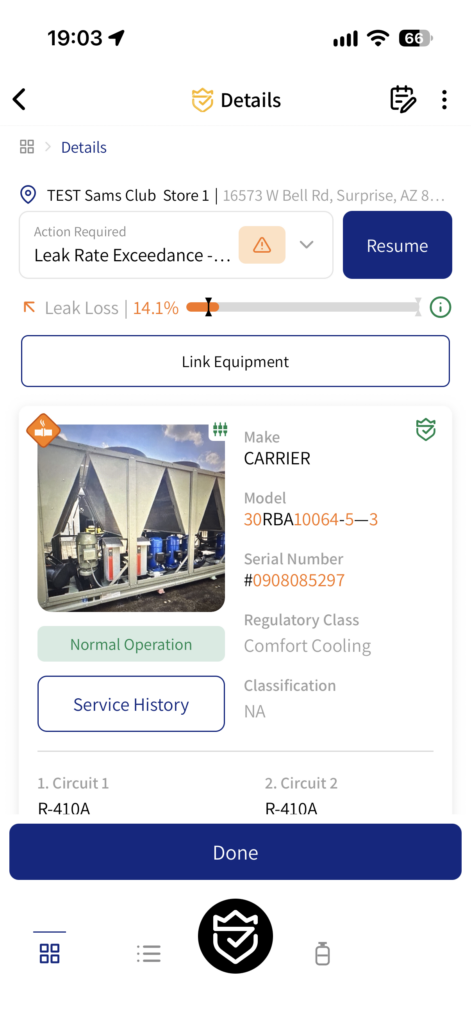
Full Charge and Current Charge
The old “charge” field is now two clear figures. Full Charge is the stable, true full charge of each circuit. Current Charge is where the circuit stands right now. Both appear on the asset screen, in service history and on each service card, along with the Leak Loss Rate as it stood at that point in time. When you set a Full Charge, you record how it was determined, and that attribution stays with the asset. Circuits past their threshold turn orange.
Overcharge Correction
If a unit was overcharged, you can now fix it from the field. Recover the excess, pick the charge it corrects, and FMHero splits the amount and corrects the resulting Leak Loss Rate. If refrigerant is left over, FMHero asks what to do with it.
See the Outcome Before You Save
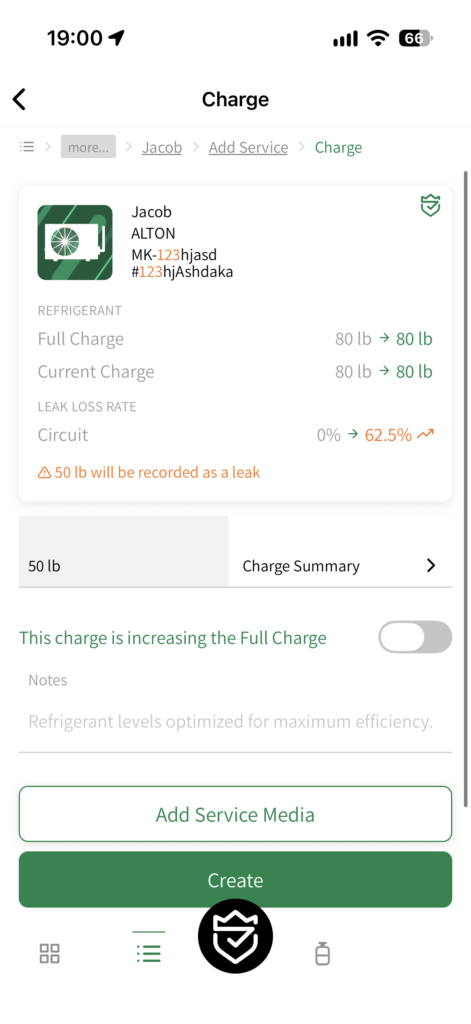
Charging, recovering, retrofitting or adjusting refrigerant now comes with a live preview. As you enter amounts, FMHero shows the resulting Full Charge, Current Charge and Leak Loss Rate for the circuit and for the whole asset. Linking components works the same way: you see what the link will do before you submit it.
Improvements
Leak Work, Circuit by Circuit
Leak inspections and repairs are now recorded against the specific circuit they belong to. The repair prompt is decided per circuit, and the circuit picker flags any circuit that has had a leak.
Media That Keeps You Informed
- Photo and video uploads now show their progress.
- Service videos appear in the field service order gallery.
- The document viewer has a rotate button for scans that came in sideways.
Faster, Steadier, Everywhere
- Notes now use a native editor that behaves properly with the keyboard.
- We rebuilt FMHero on the latest framework foundation for a faster, more stable app.
A Heads-Up!
When the new rules switch on, every asset is checked against them. If a unit is already past a threshold, an Event opens and you’ll be notified. These are not new problems and nothing got worse overnight. You now have better insight and a path to resolve them.
Summary
Your Documentation Shield just got stronger. Compliance now runs in the background, tells you when something needs attention, and walks you through fixing it. Every refrigerant figure is visible before you save it. If something looks wrong, tell us. This is a large change and we’d rather hear from you early.
ONWARD AND UPWARD